Starting a business directory website is one of those ideas that arrives at 11 p.m., looks brilliant by midnight, and has a domain name attached to it by 12:15.
We've all been there. Half the internet's unused domain names are monuments to exactly this moment.
The good news is that the idea really can work. A directory is a proven online business: you collect useful information about local businesses, attract people looking for them, and get paid by the businesses that want more attention. There's no stock to ship, and nobody will ever send you a parcel of returned socks.
Here's how to do it properly, in ten steps, without losing your weekends for the next three years.
Step 1: Pick a niche, not a planet
The fastest way to fail is to build a directory of "all businesses, everywhere." You'd be competing with Google, which has slightly more staff than you do.
Choose a specific audience instead, such as physiotherapists in one region, wedding vendors in one country, or pet-friendly hotels. The narrower your focus, the easier it is to rank, and the easier it is to convince a business that you reach the right people.
We've written a whole guide on why niche directories win, and if you're short of inspiration, there's a list of profitable directory niche ideas.
Step 2: Check that money exists
This is the least romantic step, so it's the one people skip.
Before you build anything, ask two questions. Are people searching for these businesses? And do these businesses earn enough to pay for customers?
A dentist can happily pay for a new patient, because a single patient could be worth a great deal over the years. A hobbyist who knits hats for parrots is delightful, but they aren't funding your retirement.
Step 3: Choose a domain name
Go for something short, easy to say and related to your niche. You'll say this name out loud to business owners, possibly over a bad phone line, so avoid hyphens and creative spelling.
"BestDentistsPorto" tells people what you do. "Dentzly" tells people that you've spent too long in a startup accelerator.
Step 4: Choose your directory software
You can broadly go one of three ways: a monthly hosted builder, a WordPress plugin, or a standalone directory script. Each has its fans, and we compare them honestly in WordPress directory plugin vs. PHP directory script.
Whichever way you lean, make sure the software handles the essentials: search, categories, maps, reviews, paid plans and business claims. Here's our checklist of the features your directory software really needs.
Yes, we make PHP Business Directory, so we have an opinion. We'd still rather you made a careful decision than a fast one.
Step 5: Set up hosting and install
Your directory needs a home. A reliable PHP hosting account is enough to start with, and you can move up as you grow.
If the words "database configuration" make you want to lie down, you have options. With PHP Business Directory, our team does the installation for you at no extra cost, so you can skip straight to the fun part. Whatever you use, turn on backups before you do anything else. You'll never need them right up until the moment you really do.
Step 6: Build your categories and locations
Think like your visitors, not like a filing cabinet. People don't search for "Oral Healthcare Service Providers." They search for "emergency dentist."
Keep your categories simple, limit how deep they go, and use the words customers actually use. A few well-chosen categories full of listings look far better than 400 categories containing tumbleweed.
Step 7: Fill it with listings before you launch
An empty directory is a restaurant with no diners. Nobody wants to be the first one through the door.
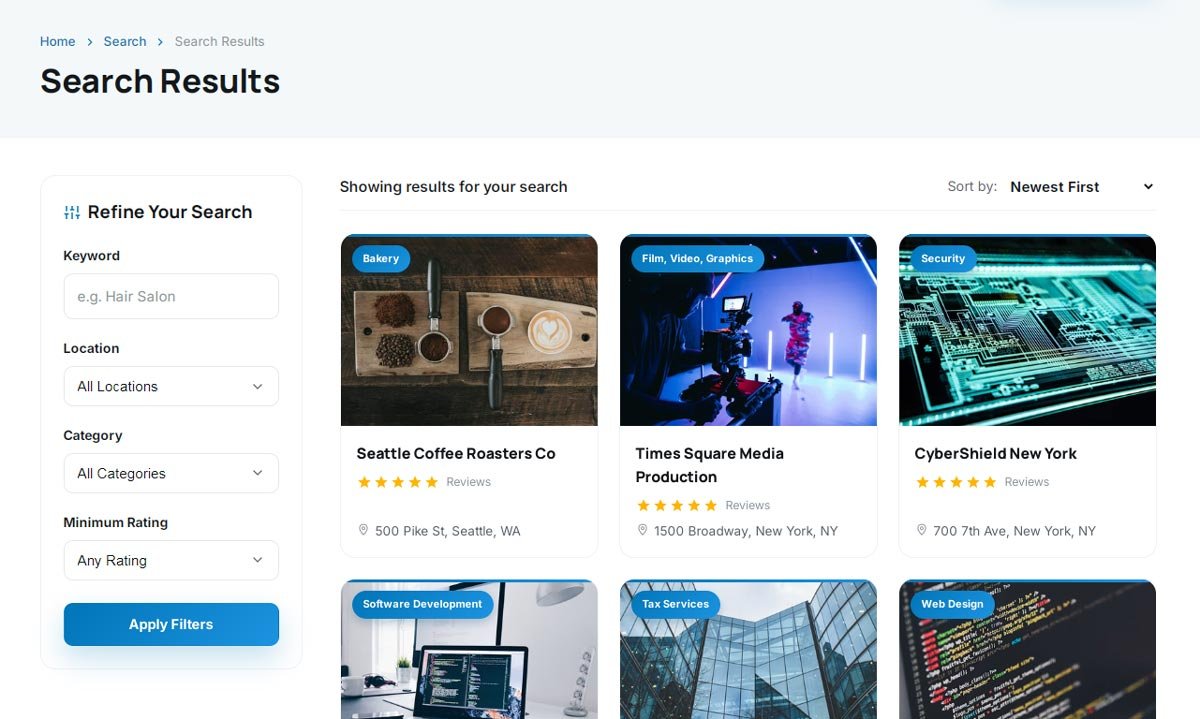
So pre-load your site with publicly available business information. You can import thousands of records from a CSV file instead of typing them in one at a time until you lose the will to live.
Aim to have every main category looking properly stocked on launch day. Our guide on getting your first 100 businesses listed has plenty more ideas.
Step 8: Set up your paid plans
Don't leave this for later. Plenty of owners spend a year building traffic and then get nervous about asking for money.
Start with a simple structure: a free listing, a paid upgrade and a featured option. Make it obvious what each one gets. Then read how to price your directory listings before you settle on a number, because most people start too low.
Step 9: Sort out your SEO on day one
Clean URLs, sensible titles, a sitemap and a fast site are all much easier to get right from the start than to fix later.
Then write a few genuinely useful articles for your audience, like a guide to choosing a contractor or what a first physio appointment involves. You'll find the full approach in our guide to ranking a directory in Google and AI search.
Step 10: Launch, then talk to humans
Launch before it's perfect. It will never be perfect, and no visitor will ever say, "This is good, but I'm troubled by the padding on the footer."
Next comes the real work. Email business owners. Phone a few of them. Join local groups. Tell them they're already listed and invite them to claim their profile. The claim workflow is how a cold listing becomes a warm conversation, and eventually a paying customer.
How long does it take?
Getting the site online can take a day or two. Filling it with good data might take a few evenings. Ranking and building trust takes longer, usually months rather than weeks, and anyone who promises otherwise probably also has a bridge to sell you.
That's actually a good thing. The patience required keeps most of your competition out.
Your first week
If you want a quick plan, try this:
- Monday: shortlist three niches and check the demand.
- Tuesday: pick one, then register a domain.
- Wednesday: try the live demos and choose your software.
- Thursday: gather your first batch of business data.
- Friday: map out your categories and plans.
By the weekend, you'll have something much better than a clever idea and an expired domain. You'll have a business that's getting started.