The listing page is the most important page of the directory: it is where a visitor decides to call, visit or book a business. It is also the page that search engines show for searches by business name.
Header and actions
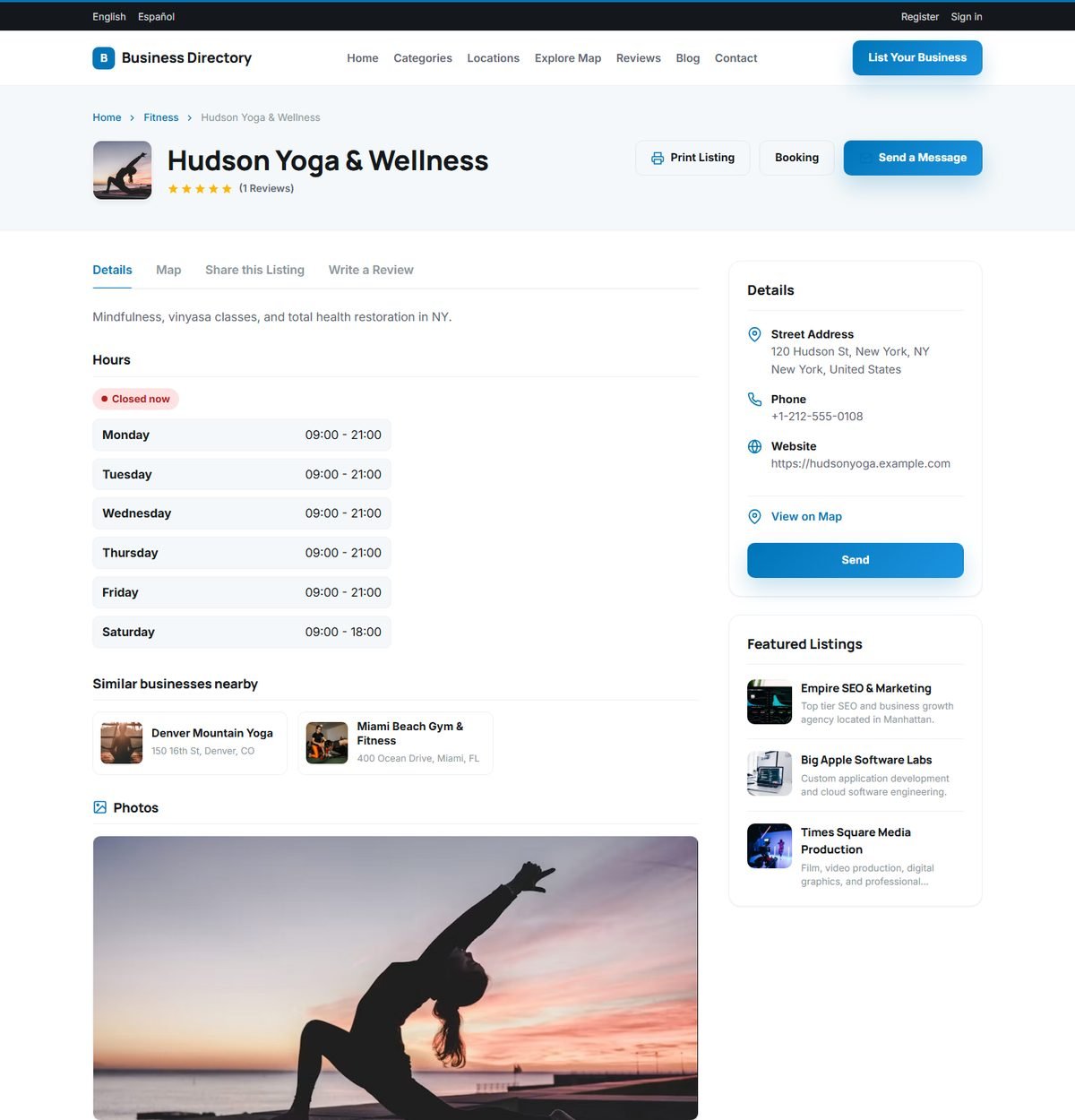
The top of the page shows the business logo, name, category and star rating with the number of reviews. Three buttons give quick access to the main actions:
- Print Listing: a clean printable version of the listing.
- Booking: opens the appointment calendar. It appears when the business takes appointments.
- Send a Message: jumps to the contact form.
Tabs
- Details: the description, opening hours, custom fields, similar businesses and photos.
- Map: the location on an interactive OpenStreetMap map, when the listing has map coordinates.
- Share this Listing: buttons for sharing on social networks, and a form for recommending the listing to a friend by email.
- Write a Review: opens the review form.
Opening hours and "Open now"
The opening hours entered for each day of the week are shown in a table, with a badge that says Open now or Closed now. The badge is calculated with the time zone of your website, set in System Settings, Tracking Codes and Social Links.
Contact details and the contact form
The Details box shows the street address, phone number and website link, and a View on Map link. Below it, the Contact form sends a message to the business owner by email: the visitor enters a contact name, email address, an optional phone number and the message. If the listing belongs to a registered user, the message is also saved in their user panel.
Whether the website link is a normal "dofollow" link, which passes SEO value to the business website, depends on the listing's package. This is a popular reason for businesses to choose a paid package. See Listing Packages and Pricing Plans.
Photos and video
The listing shows its main image or logo in the header and the other photos in a gallery that opens in a full-screen viewer. The number of photos allowed depends on the package. A YouTube video can be added to any listing.
Similar businesses nearby
Each listing suggests other businesses from the same category, starting with those in the same region. This keeps visitors on your website and gives every business extra exposure.
What customers say (AI summary)
When the AI features are enabled and a listing has at least three reviews, a short, balanced summary of the reviews appears on the page. The summary is generated once and stored, and is only refreshed when new reviews arrive, so it does not cost an AI request on every page view.
Claim this listing
Listings that do not belong to a registered user, for example listings you imported, show a Claim this listing link. See Claiming an Existing Listing.
Built-in SEO
Every listing page has its own page title and meta description, schema.org LocalBusiness data with the address, map position, phone, opening hours and rating, Open Graph tags for attractive previews when the page is shared, and a canonical URL. The page also shows the date the listing was added and the number of times it was viewed.
Pending, rejected and deleted listings return a "page not found" response to visitors. Only the owner and administrators can still see a pending listing.