Admin Panel › Directory › Claimed Listings
When a business owner claims an existing listing on the website, the request appears here. See Claiming an Existing Listing for how claims are made.
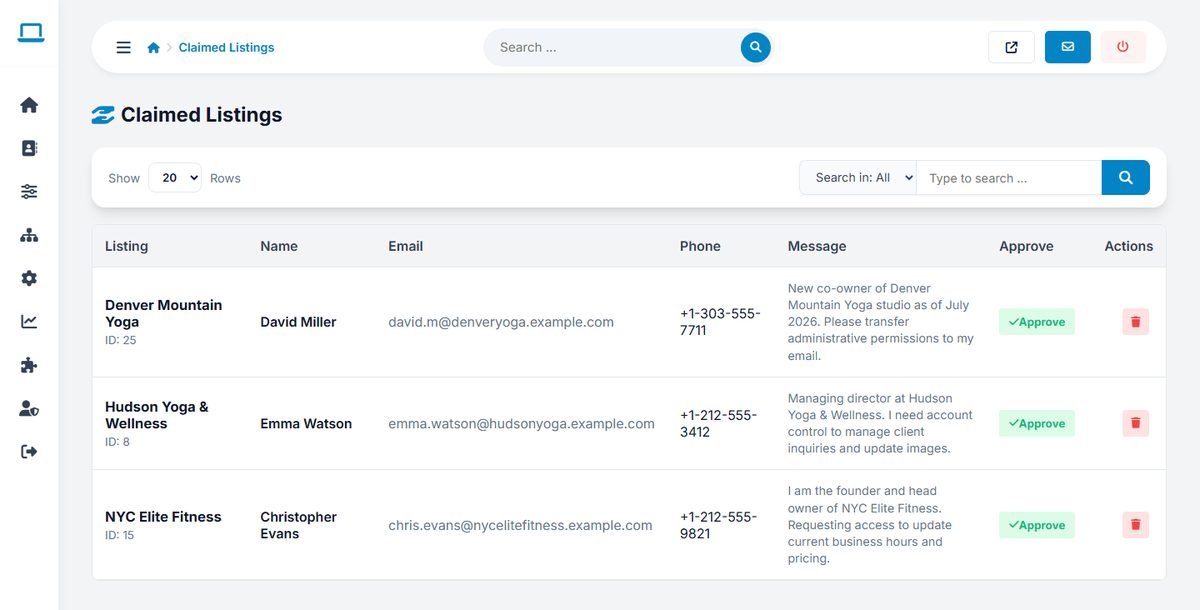
Reviewing a claim
Each claim shows the listing (with its ID), the claimant's name, email address and phone number, and their message. Before approving, make sure the person really represents the business:
- Call the phone number shown on the listing (not the one in the claim) and ask for the person.
- Check that the email address uses the business's own domain, for example
name@hudsonyoga.comrather than a free email service. - For high-value listings, ask for a document such as a business registration or a utility bill.
Approving or rejecting
- Approve transfers the listing to the claimant and marks it as claimed. The claimant receives an email with a private link for managing the listing.
- The delete button rejects the claim. The listing does not change.
A claimed listing is a warm lead. A short personal email after the approval, offering a featured upgrade or a banner, converts better than any advertising.