Search engines are the main source of visitors for most directories. PHP Business Directory creates thousands of useful, well-structured pages automatically; this chapter explains what it does and what you can improve.
Friendly URLs
With Enable SEO URLs switched on, every page has a readable address that includes its name:
| Page | Example URL |
|---|---|
| Listing | /en-listing-hudson-yoga-wellness-8 |
| Category | /en-category-it-50 |
| Subcategory | /en-category-agencies-counselors-2-1 |
| Location | /en-location-new-york-229-37 |
| Page | /en-contact |
| News article | /en-news-new-feature-browse-by-interactive-map |
Page titles and descriptions
Every listing, category, location and search page has its own title and meta description, generated from its content. You can override them:
- Listings: the custom meta title and description in the listing editor, optionally suggested by the AI.
- Categories and locations: the Custom Titles pages, below.
- Pages and news: the meta title and description of each language.
- Suffix: Seo Append Title and Seo Append Description in Directory Configuration Options.
Category and location texts
Admin Panel › Directory Settings › Category Custom Titles / Location Custom Titles
These pages list every category or location. Default means it uses the automatic title and description. Click Edit to set:
- Page title: for example "Italian Restaurants in Chicago – Reviews & Menus".
- Meta description: the text search engines show under the title.
- Intro text shown above the listings: a paragraph that tells visitors and search engines what the page is about.
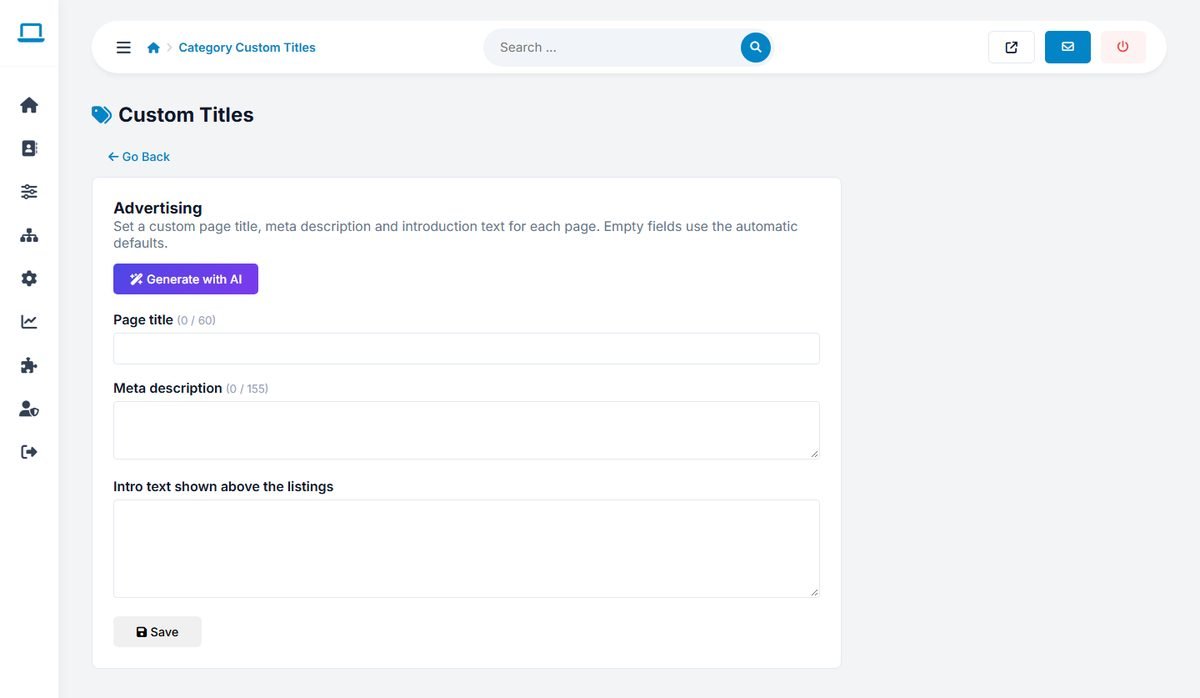
Generate with AI writes all three for you. Fields left empty use the automatic defaults. Start with your most important categories and locations; unique intro texts on these pages make a real difference.
Sitemap
The XML sitemap is at yourdomain.com/sitemap.php. It lists your pages, the listings, and the category and location pages that contain listings, in every language. Empty category and location pages are left out on purpose. Submit the sitemap address in Google Search Console and Bing Webmaster Tools.
Structured data and sharing
- Listing pages include schema.org
LocalBusinessdata with the address, coordinates, phone, opening hours and rating, which can produce rich results in Google. - Open Graph and Twitter tags give attractive previews when pages are shared on social networks and messaging apps.
- Canonical URLs prevent duplicate pages from competing with each other.
SEO checklist
- Enable SEO URLs and submit the sitemap.
- Add Google Search Console verification in Settings › Tracking Codes.
- Write custom texts for your top categories and locations.
- Encourage owners to write full, original descriptions; the AI writing assistant helps.
- Publish a news article every week or two.
- Get links from local organizations, chambers of commerce and the businesses you list.