Admin Panel › Directory Settings › Categories
Categories are edited as plain text: one category per line, in a tree that you can change with copy and paste. There is one tree per language, so category names can be translated.
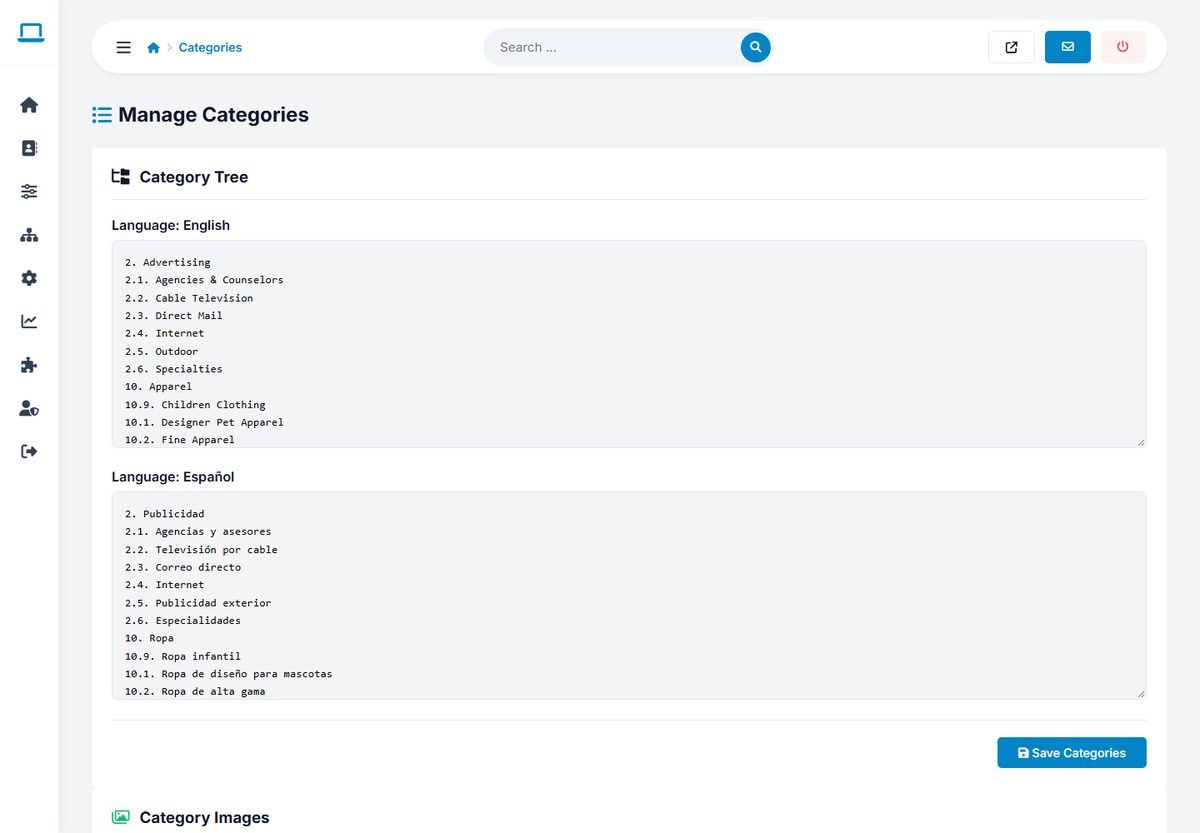
The category tree format
Each line starts with the category number, a dot and a space, followed by the name. Subcategories add their own number after their parent's number:
2. Advertising
2.1. Agencies & Counselors
2.2. Cable Television
10. Apparel
10.1. Designer Pet Apparel
10.2. Fine Apparel
Here "Agencies & Counselors" is the first subcategory of "Advertising". Click Save Categories to save all languages at once.
Adding, renaming and removing
- Add a category with a new line and a number that is not used yet, for example
12. Wedding Venuesor12.4. Barns & Farms. - Rename a category by changing only the text after the number.
- Remove a category by deleting its line. First move its listings to another category, or they will no longer appear in any category.
- Reorder categories by moving lines up or down. The numbers do not have to be in order.
Never change the number of an existing category. Listings are linked to categories by their numbers, so a listing in 2.1 would suddenly belong to whatever category now has that number.
Starting from scratch? Paste a list of names without any numbers, one per line. The directory numbers them automatically. Then add subcategories by hand.
Translating categories
Each language version has its own tree with the same numbers. To translate, change only the names in that language's box, keeping the numbers identical to the English tree. A category added in one language must also be added, with the same number, in the others.
Category images
Below the tree, Category Images shows a tile for each main category. Click Edit on a tile to upload an image or delete the current one. The images appear on the category tiles of the home page and the categories page. Use photos of the same size and style, for example 800 × 600 pixels, for a tidy look.
Page titles and texts for categories
Each category page can have its own title, meta description and introduction text, written by you or by the AI. See SEO: URLs, Titles, Sitemap and Structured Data.